
Learn how to set up a flat-rate allowance that automatically adds extra pay when employees work on Regular and Special Holidays ensuring accurate and automated payroll calculations.
🧭 Overview
PayrollHero now supports day-type based allowance computation, allowing you to:
- Apply a flat allowance for regular working days
- Automatically add extra allowance when employees work on holidays
- Reduce manual payroll adjustments
This helps ensure accurate, consistent, and automated allowance payouts.
💼 What This Feature Does
With this enhancement, your Allowance Template can:
- Apply a standard flat allowance for regular days
- Add a holiday premium automatically
- Compute allowance based on the actual day type worked
⚙️ How It Works
Step 1: Configure the Allowance Template
No, just apply flat rate and choose the Applicable Daily Rates
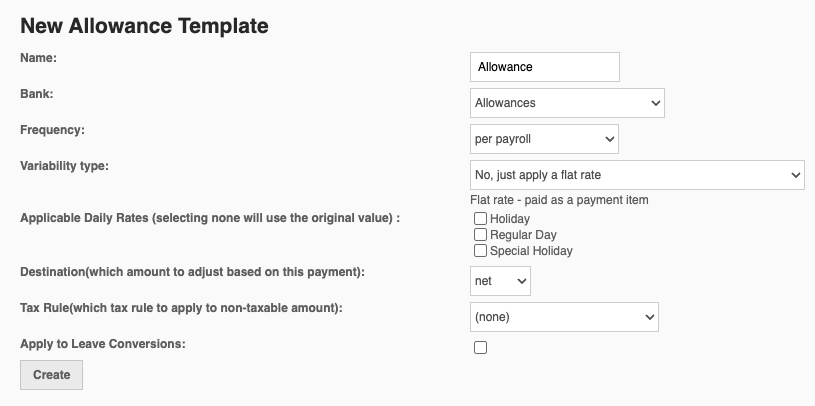
Tooltip:
- Internal Display: Admin only (Account Owner, Payroll Admin, HR Admin)
- Critical Function: Allows PayrollHero to apply a flat allowance and automatically adjust it based on day type worked
Step 2: Define the Flat Allowance
Set your allowance as usual.
Example:
- Monthly Allowance: ₱3,000
Step 3: Holiday Premium Rules
| Day Type | Allowance Applied |
| Regular Working Day | Flat allowance only |
| Regular Holiday | Flat allowance + 100% of daily allowance |
| Special Holiday | Flat allowance + 30% of daily allowance |
🧮 Daily Allowance Formula
Daily Allowance = (Monthly Allowance × 12) ÷ Total Working Days in a Year
💡 This ensures fair and consistent daily computations across payroll periods.
📊 Sample Computation
Monthly Allowance: ₱3,000
Working Days: 261
Daily Allowance: ₱137.93
| Scenario | Computation | Total |
| Regular Day | ₱137.93 | ₱137.93 |
| Regular Holiday | ₱137.93 + ₱137.93 | ₱275.86 |
| Special Holiday | ₱137.93 + ₱41.38 | ₱179.31 |
✅ All values are rounded to two (2) decimal places
🔄 What Happens During Payroll
Once configured:
- PayrollHero detects the day type worked
- Automatically applies the correct allowance + premium
- Reflects results directly in payroll outputs and reports
👉 No manual adjustments needed during payroll processing
❗ Important Notes
- Applies only if the employee has attendance on the holiday
- If no work is recorded, no additional allowance is applied
- Company policies may affect eligibility and setup
💡 FAQs
Can I disable the holiday premium?
Yes. Simply do not enable the feature in the Allowance Template.
Does this affect existing allowances?
No. Existing setups remain unchanged unless this feature is enabled.
Can this be used for daily allowances?
Yes. If already set daily, no conversion is needed.
🚀 Why This Matters
This feature helps you:
- Reduce manual payroll work
- Ensure consistent allowance computation
- Align with common payroll practices for holiday work