
Overview
PayrollHero supports PhilHealth contribution exemptions for qualified Persons with Disabilities (PWDs) and Solo Parents, in accordance with:
- PhilHealth Circular No. 2026-0017 – Persons with Disabilities (PWDs)
- PhilHealth Circular No. 2026-0015 – Solo Parents
Under these provisions, the National Government covers the portion of the PhilHealth premium normally deducted from qualified employees, while employers continue paying their regular share.
PayrollHero automatically applies the exemption based on the verification date entered in the employee’s PhilHealth enrollment.
Option 1: Update an Individual Employee
Step 1: Open the Employee Profile
Log in to PayrollHero and navigate to the employee’s profile.
Step 2: Edit PhilHealth Enrollment
Locate the employee’s PhilHealth Enrollment and click Edit.
Step 3: Enter the Verification Date
Select the appropriate field:
- PWD Verified On (PhilHealth Circular 2026-0017) – For qualified PWD employees.
- Solo Parent Verified On (PhilHealth Circular 2026-0015) – For qualified Solo Parent employees.
Enter the date corresponding to the employee’s verified PhilHealth eligibility.
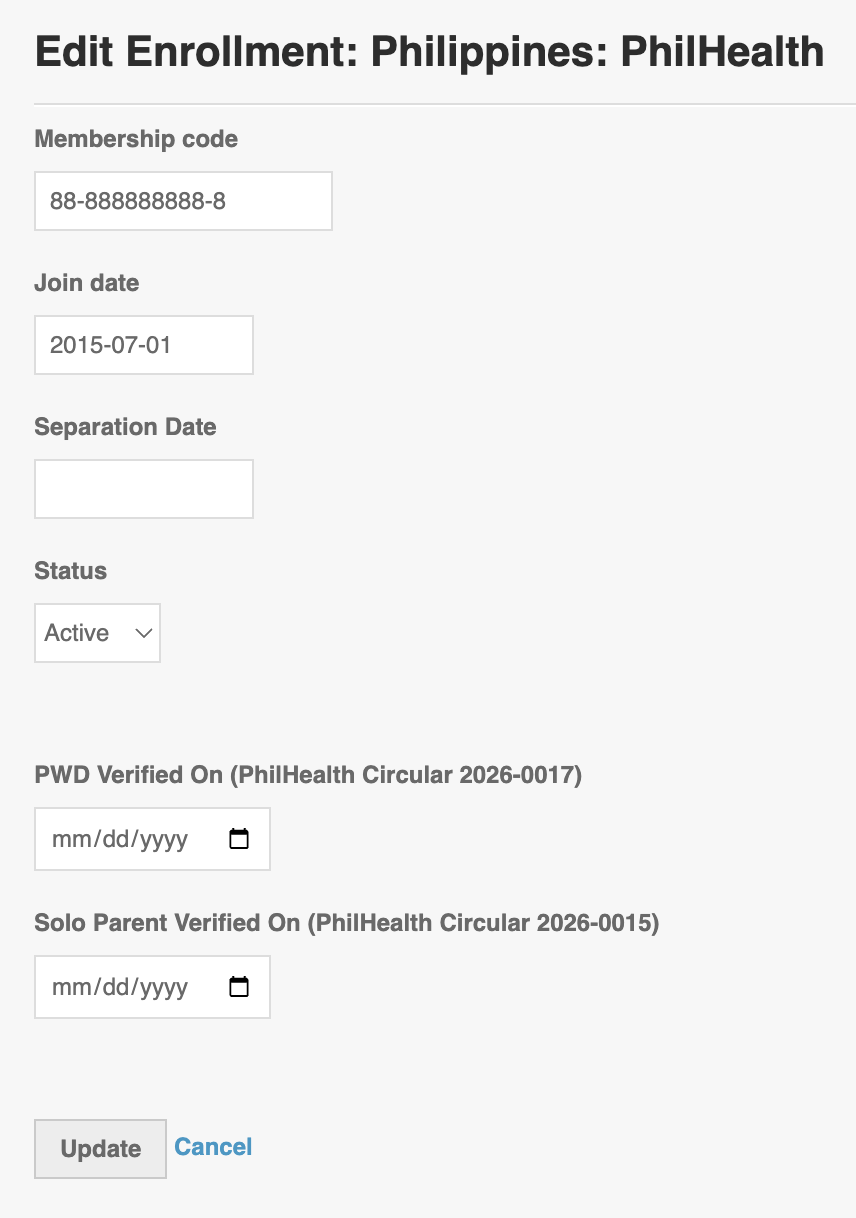
Step 4: Save the Changes
Click Update to save the enrollment details. PayrollHero will apply the applicable exemption when calculating payroll.
Option 2: Update Multiple Employees (Bulk Update)
For multiple employees, use PayrollHero’s Multi-Insert Tool – Employees Government Enrollment Update to update their PhilHealth enrollment information in bulk.
Follow the instructions in our Knowledge Base article:
Multi-Insert Tool – Employees Government Enrollment Update
Ensure that the correct PWD or Solo Parent verification dates are included in the upload.
How the Exemption Affects Payroll
Once the exemption is applied:
- Employee PhilHealth Deduction: ₱0
- National Government Share: Covers the employee portion without affecting net pay.
- Employer Share: Continues to be calculated normally.
Sample Computation
For a total monthly PhilHealth premium of ₱1,000:
| Contribution | Amount |
|---|---|
| Employee Deduction | ₱0.00 |
| National Government Share | ₱500.00 |
| Employer Share | ₱500.00 |
The National Government share is for reference only and is not deducted from the employee’s salary.
Refunds and Adjustments
PayrollHero also supports refunds or adjustments for PhilHealth contributions already deducted within the applicable exemption month.
Example:
An employee’s complete PWD requirements were submitted on October 10, but their PhilHealth contribution was already deducted during the October 1–15 payroll.
In this scenario:
- The exemption applies to the entire October contribution month.
- The previously deducted employee contribution is refunded or adjusted in the October 16–31 payroll.
- The refund is reflected in the payroll computation without modifying the previously finalized payroll.
- The employer’s contribution remains unchanged.
Important Reminders
- Verify eligibility. Ensure the employee is properly registered or verified with PhilHealth before applying the exemption. Supporting documents can be uploaded through PayrollHero’s Requirements page.
- Use the correct verification date. For PWD employees, the exemption begins in the month the employer submits the complete requirements to PhilHealth.
- Review payroll adjustments. Check any refunds or adjustments reflected in the subsequent payroll to ensure accuracy.
- Employer contributions remain applicable. The employer must continue paying its regular PhilHealth share.
References
- PhilHealth Circular No. 2026-0017 – Persons with Disabilities
- PhilHealth Circular No. 2026-0015 – Solo Parents
For additional assistance, please contact the PayrollHero Support Team.