
Learn how to configure the correct hierarchy, permissions, and visibility so managers can receive leave request notifications and approve requests in PayrollHero.
To make sure leave requests reach the right approver—and can actually be approved—you’ll need to configure three key areas:
- Organizational structure
- Subordinate visibility
- System permissions
If any of these are missing, approvals may not work as expected.
Let’s walk through it step by step.
🔹 Step 1: Set the Correct Organizational Structure
For an approver to receive leave requests, they must be assigned as the superior (manager) of the requesting employee.
How to check:
- Go to the employee’s Profile
- Review the employee’s Position
- Confirm that this position reports to the approver’s position in the org chart
Here’s our support article on how to add positions and assign their corresponding superiors.
👉 If this is not configured correctly, the approver will not receive leave request notifications
🔹 Step 2: Configure Subordinate Settings
The approver must have visibility over the employees they manage.
Steps:
- Go to the approver’s Profile
- Navigate to the Subordinates page
Configure one of the following:
- All Employees – full visibility
- Filter by Tag – limited visibility based on assigned tags (e.g., HR Department, Manila Team)
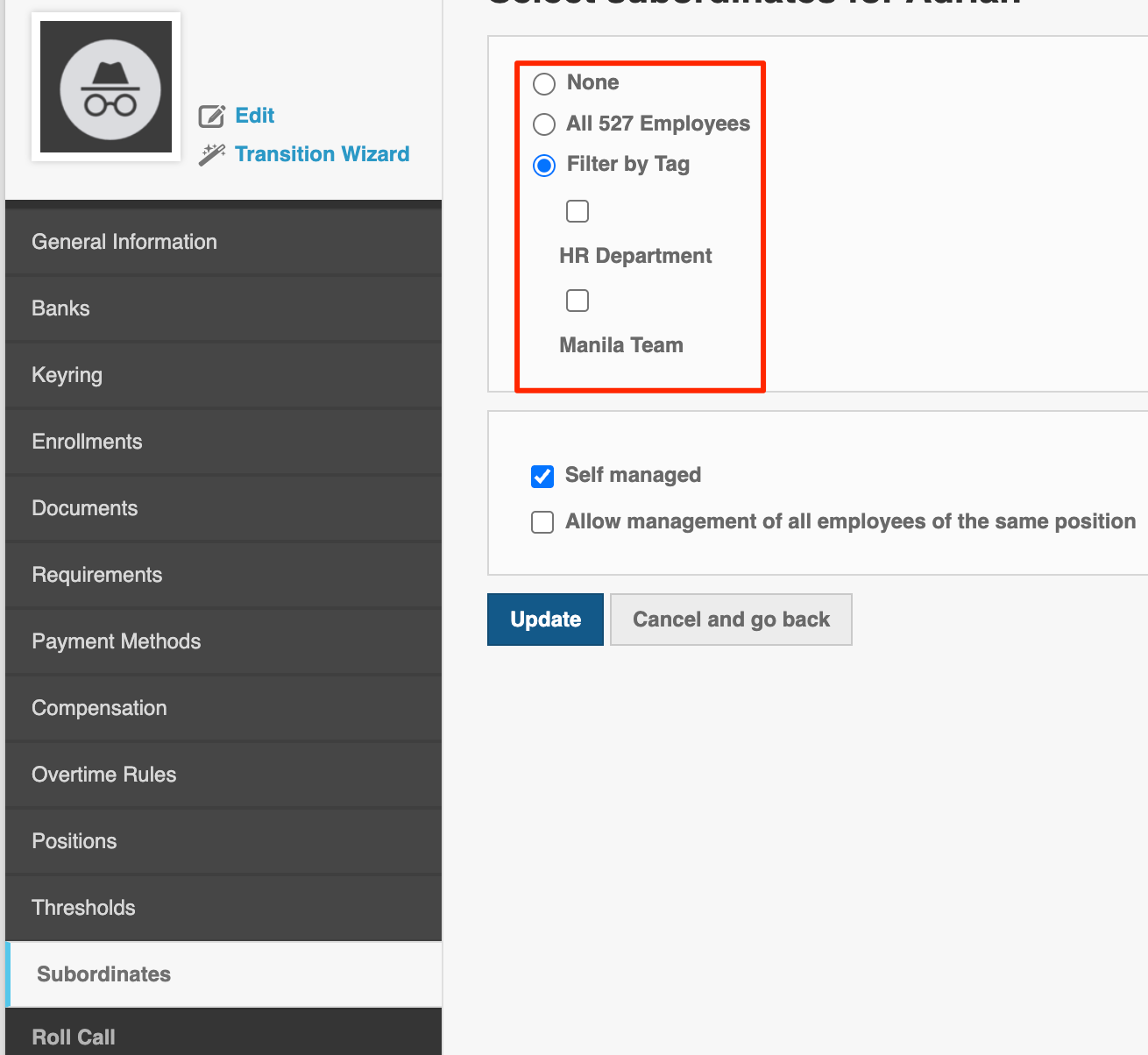
🧾 Field Breakdown: Subordinate Access
Subordinate Visibility Setting
- Internal/External Display: Internal (Admins / Managers)
- Critical Function: Controls which employees the approver can view and manage. This directly impacts whether they can see and act on leave requests.
👉 If employees are not included here, their leave requests may not appear for approval.
🔹 Step 3: Enable Leave Management Access
The approver must have permission to access the Leave Management module.
Steps:
- Go to System Permissions
- Edit the permission assigned to the approver
- Scroll to the Leave Management section
- Set:
- “Their own Leave Requests” → Has Access
- (Optional) Enable additional permissions depending on role
🧾 Field Breakdown: Leave Management Permission
Leave Management Access
- Internal/External Display: Internal (Admins / Managers)
- Critical Function: Allows the user to view, approve, or reject leave requests. Without this, the approver cannot process requests even if they receive notifications.
👉 Without this permission, the approver may receive notifications but cannot approve requests
🔹 Step 4: Verify Notification Setup
Once everything is configured correctly:
- The approver should receive leave request notifications
- The approver should be able to approve or reject requests within the system
✅ Troubleshooting
If the approver is not receiving notifications or cannot approve requests, check the following:
✔️ The employee has a superior assigned in the org structure
✔️ The approver’s Subordinate settings include the employee
✔️ The approver has Leave Management access enabled
✔️ The leave request was successfully submitted
❓ FAQs
Why isn’t the approver receiving leave notifications?
Most likely, the reporting hierarchy is not set correctly or the employee is not included in the approver’s subordinate list.
Can someone approve leave without being a direct manager?
Yes—if they are granted the correct permissions and visibility. However, most setups rely on the reporting hierarchy for automatic routing.
Can multiple approvers receive the same request?
Yes. This depends on how your organization structure and permissions are configured.
What happens if no approver is assigned?
Leave requests may remain pending and won’t be reflected in attendance or payroll until approved.
📌 Summary
To enable leave approvals and notifications in PayrollHero:
- Set the correct superior in the organizational structure
- Configure subordinate visibility
- Grant Leave Management permissions
💡 All three must be correctly configured for approvals to work smoothly.