
Great news! PayrollHero now offers a simplified and automated way to convert expired leave balances. Previously, when employees’ leave credits expired at the end of the year or at any custom annual cycle. Admins had to manually track and collect those expired credits for conversion. This process was time-consuming and prone to errors.
With the new Expired Leave Conversion feature, you can now automatically convert unused leave balances from past expiration cycles with just a few clicks. This ensures accurate reporting, smoother year-end processes, and eliminates the need for manual reconciliation. It’s especially useful for teams with annual leave expiry policies who need to convert unused balances into cash value, points, or other company-defined equivalents.
Setup Instructions
Follow the steps below to enable and process the conversion of expired leave credits:
Enable Leave Expiry
- Go to the Leave Accruals page.
- Ensure that Expire Leaves is enabled.
- Mark the checkbox “Allow conversion of leaves from past expiration cycle.”

Process Leave Conversion:
- Go to the Leave Conversion page.
- Click the Convert button
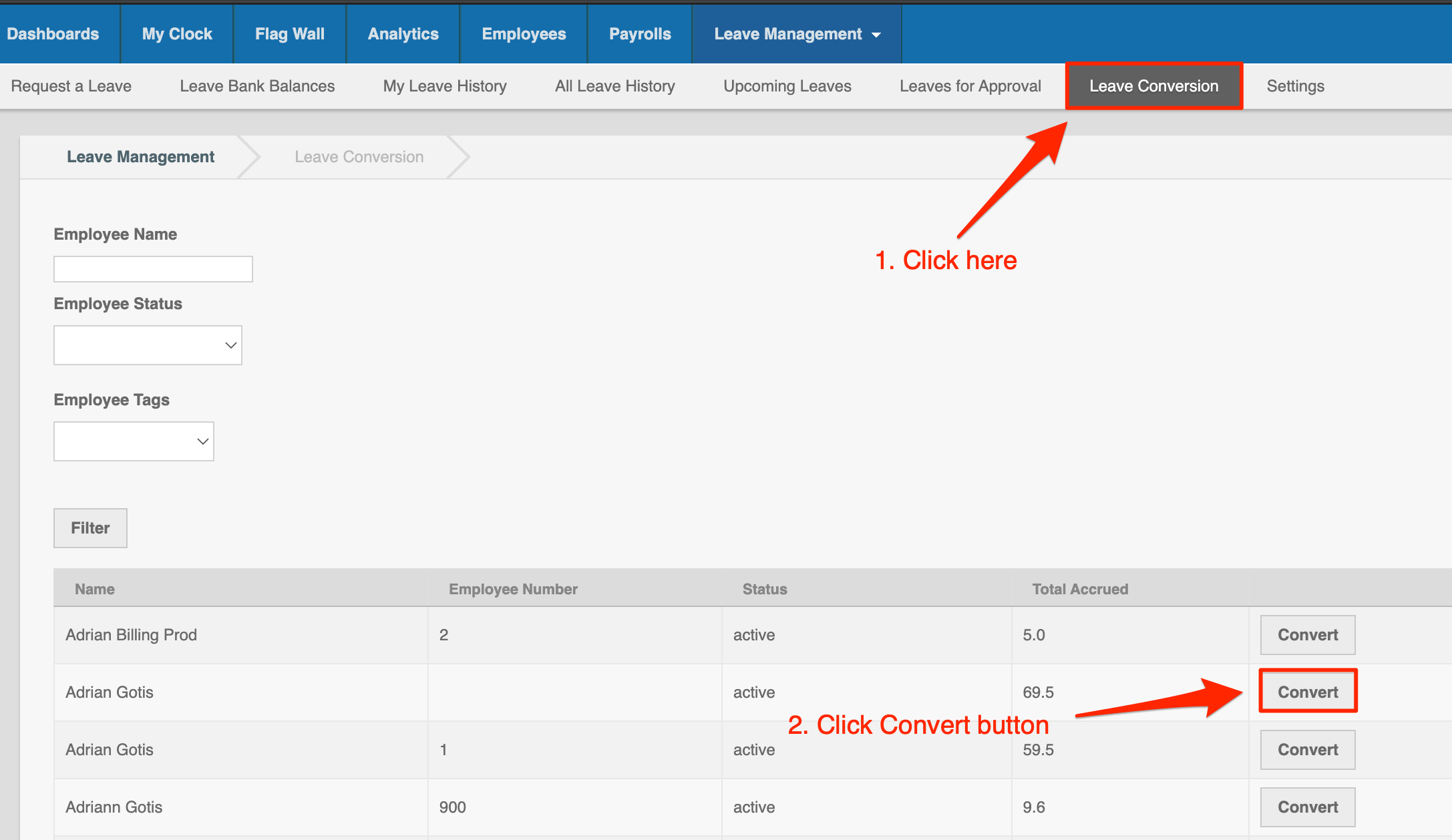
- Review the leave credits to be converted and edit the total if needed.
- Important: Make sure you are not converting any leave credits from the current year.
- Click “Yes” to confirm and complete the conversion.

You can now begin converting your employees’ expired leave balances quickly and seamlessly!